
Imagine an EKS upgrade where Terraform reports success, the control plane is active, and the deployment dashboard stays green. Then the first worker node drains. Replacement pods remain pending because their volume and placement constraints leave nowhere to run. The Kubernetes version changed successfully; the service still has an outage.
An upgrade plan needs to explain how applications cross that transition. This article uses a 1.35 → 1.36 managed-node-group example, with separate Terraform changes for the control plane, nodes, and add-ons. Both versions are in EKS standard support as of September 25, 2026. Confirm availability and support dates in your Region before selecting a target. EKS release calendar
The operating principle is straightforward: automate the evidence and repeatable actions, then require a person to approve each consequential transition. Completion means the applications still perform their jobs and the remaining recovery options are understood.
Know which version you are changing
“The EKS version” hides several independently maintained components:
| Layer | What changes | Evidence to retain |
|---|---|---|
| Control plane | Kubernetes API server and managed control-plane components | Cluster version, update result, API availability |
| EKS platform | AWS platform revision and control-plane patches | Platform release notes and observed revision |
| Worker nodes | Kubelet, AMI, operating system, runtime and bootstrap configuration | Node versions, image/template identity, node health |
| Add-ons | VPC CNI, CoreDNS, kube-proxy, EBS CSI, Pod Identity Agent where installed | Compatible versions, configuration, functional checks |
| Controllers and clients | Karpenter or Cluster Autoscaler, webhooks, operators, GitOps and kubectl | Release compatibility and real operations |
| Applications | Manifests, API usage, scheduling and data dependencies | Availability and business-transaction results |
AWS automatically advances EKS platform revisions within a Kubernetes minor release. Those revisions are distinct from the minor-version change you request. EKS platform versions
Assign an owner to every row. A controller maintained through Helm remains a dependency even when its release lives outside the Terraform state. A plan cannot review a configuration it does not manage.
Prove the application can survive a node replacement
Begin with the event that actually moves workloads: losing a serving node. Inspect replica counts, topology spread, affinity, resource requests, subnet addresses and spare capacity. Capacity must satisfy placement and storage constraints; aggregate unused CPU is a weak substitute for a viable destination.
For a replicated service, combine readiness and startup probes with graceful shutdown. Confirm the application handles termination, finishes or retries outstanding work, and leaves enough time for load-balancer target draining. Configure Deployment surge and unavailable limits deliberately. A PodDisruptionBudget constrains supported voluntary evictions; it does not control a Deployment's own rolling update or prevent involuntary failures. Kubernetes disruption behavior
The companion workload example uses three replicas, a PDB requiring two available replicas, and a rollout allowing one extra pod. Those settings illustrate a capacity contract, not universal production defaults. A single-replica database with minAvailable: 1 can block a drain without making the database highly available. Its owner needs replication, a planned interruption, or another explicit recovery arrangement.
Define success before starting: acceptable error rate and latency, DNS resolution, ingress reachability, volume attachment, and a representative read/write transaction. Record the baseline and observation period. A short HTTP probe is useful, but it cannot certify a checkout flow or a durable database write.
Build compatibility evidence before planning
Run EKS upgrade insights, inspect the affected resources, and read each controller's release notes. Include manifests that are applied infrequently: a quarterly recovery job can retain a removed API long after ordinary deployments have migrated. Rehearse the target version with representative workloads and restored test data.
The companion inventory script collects cluster, node-group, add-on, node and PDB information without changing AWS resources. For individual add-ons, query both source and target compatibility instead of assuming the newest build is suitable:
aws eks describe-addon-versions \
  --region "$AWS_REGION" --addon-name vpc-cni \
  --kubernetes-version 1.36 --output json
The API exposes compatibility by Kubernetes version and compute type. Select a documented transition path for each installed add-on, including configuration and identity requirements. Add-on compatibility
Upgrade the control plane one minor version at a time. Align older worker nodes before starting and check EKS-specific prerequisites as well as upstream skew rules. The Kubernetes policy forbids kubelets newer than the API server; its allowance for older kubelets is a migration window, not an instruction to leave the fleet behind indefinitely. Keep kubectl within its supported skew too. EKS upgrade procedure, Kubernetes version skew
Stage any prerequisite controller or add-on update before the control-plane change. Afterward, advance the remaining components in their documented order. Compatibility can require a different order for different plugins.
Express the upgrade as separate Terraform plans
Pin the CLI, provider and any module versions, then commit the dependency lock file. The downloadable reference uses Terraform 1.15.7 and AWS provider 6.66.0 so its schema can be checked against specific versions. Adapt its version controls to your existing resource addresses; it is not a recipe for importing a production cluster into an empty state.
Make node versions independent of the control-plane input. If every node group inherits the changed cluster version, the same apply can begin rolling the fleet immediately. An ordinary resource dependency orders API operations; it does not insert an application observation period. Download the reference examples.
The intended values across three stages are:
| Stage | Control plane | Canary pool | General pool |
|---|---|---|---|
| Control-plane change | 1.36 | 1.35 | 1.35 |
| Canary rollout | 1.36 | 1.36 | 1.35 |
| Fleet rollout | 1.36 | 1.36 | 1.36 |
These are desired inputs, not measured results. Pin the matching AMI release for each pool and keep add-on versions explicit. Terraform's node-group resource exposes version, release and disruption settings separately. AWS provider node-group reference
For each stage, create a fresh saved plan, inspect it, then apply that exact file after approval:
terraform plan -input=false -out=tfplan \
  -var-file=environment.tfvars.json \
  -var-file=stage.tfvars.json
terraform show -no-color tfplan
# After the required review:
terraform apply -input=false tfplan
A saved plan removes the interactive apply prompt; the approval must live in the surrounding workflow. Saved plans can contain sensitive values, so protect their storage and access. Terraform plan reference
Reject unexpected creates, deletes and unrelated updates. The companion policy limits each stage to named resource addresses; the reviewer must still inspect every changed attribute. Preserve remote-state locking and serialize changes to the same cluster. If a runner times out, inspect the AWS update and refresh Terraform's view before retrying: ending the runner does not establish that AWS stopped the operation.
Upgrade the control plane, then roll nodes in waves
Approve the control-plane plan after reviewing compatibility and recovery evidence. Observe the resulting API version and application behavior before authorizing node changes. Test fresh deployments and connections so long-lived sessions do not hide a broken access path.
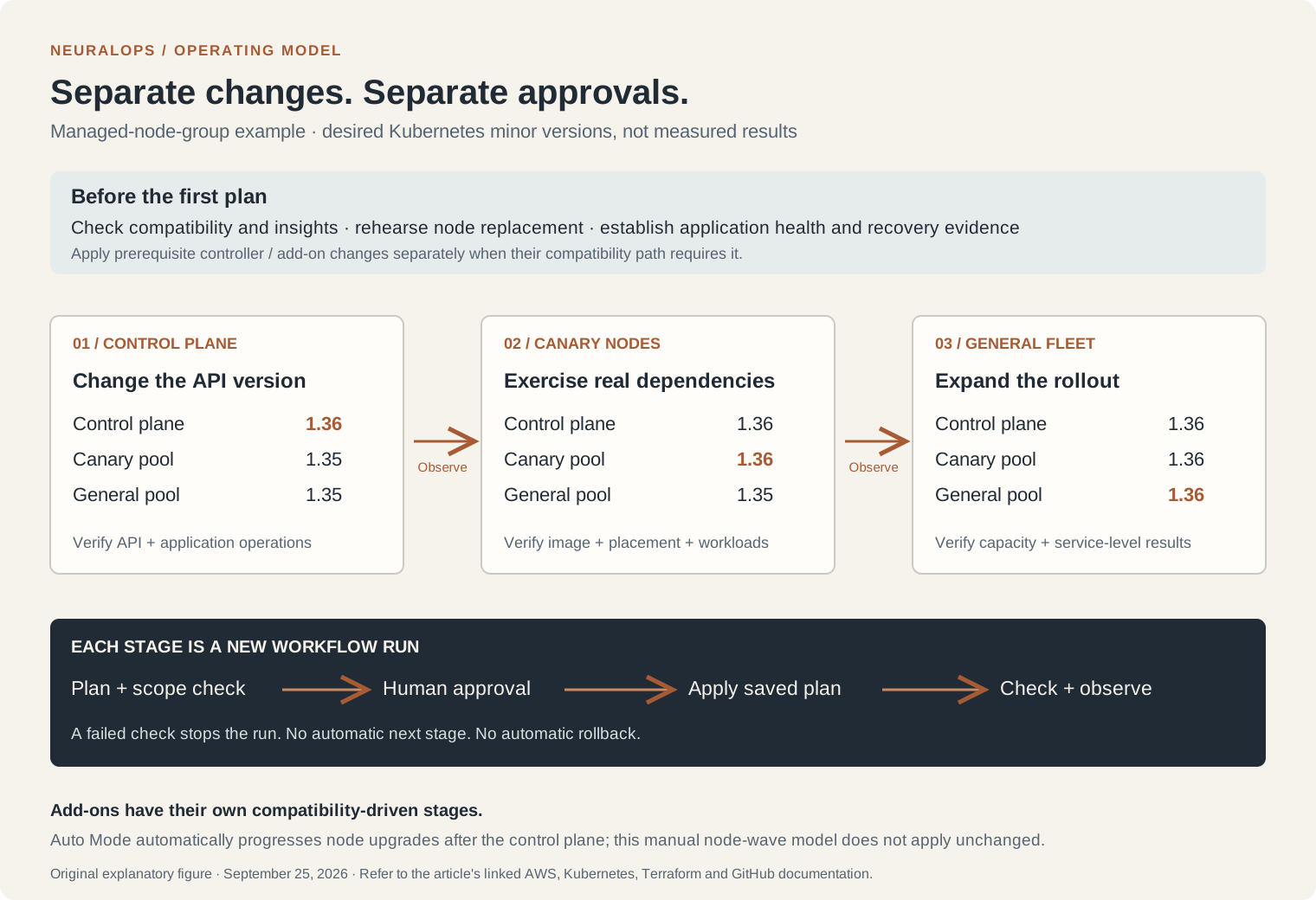
The managed-node-group example introduces observation points between separate applies. Prerequisite add-on changes happen earlier when compatibility requires them.
For managed node groups, the default update strategy launches replacement capacity before terminating old nodes. The minimal strategy terminates first to constrain capacity. Review both the disruption setting and the required surge capacity: max_unavailable = 1 does not mean AWS can launch only one extra instance. Stalled eviction and insufficient capacity deserve investigation before forcing progress. Managed-node update phases
Choose a canary pool that exercises the dependencies you care about. A stateless test pod proves little about GPU workloads, custom bootstrap scripts or volume-bound services. Record replacement instance identity, node readiness, scheduling outcomes and application checks, then expand the rollout.
Worker types need different handling:
Finish with the remaining compatible add-on and client updates, then observe normal scheduling, scaling and recovery activity. Keep old image references and configuration available until the agreed observation period ends.
Recover the component that failed
AWS introduced EKS Kubernetes version rollback on July 1, 2026. An eligible cluster can return to its previous minor release within seven days of upgrade completion. The feature changes an old assumption about EKS upgrades, but recovery still depends on the surrounding components. AWS rollback announcement
Start with the symptom. A bad application deployment may need a manifest/image revert. A broken new AMI may need replacement capacity using a known compatible image. An add-on regression needs its own compatible version and configuration. Preserve database recovery decisions separately from these infrastructure changes.
Before control-plane rollback, review ROLLBACK_READINESS insights, repair incompatible add-ons, and ensure worker kubelets will not be newer than the target API server. The cluster must meet the documented eligibility conditions; a second upgrade does not provide a chain of rollbacks to every earlier version. Rolling back into extended support also requires the corresponding upgrade policy. Current cluster data and add-on versions are preserved, so this operation is not a database restore. EKS rollback prerequisites
There is a documentation discrepancy to account for. The new rollback guide describes managed-node rollback through UpdateNodegroupVersion, while that API's reference still says earlier Kubernetes and AMI versions cannot be restored. The pinned provider forwards version changes to the update APIs; that code path does not prove service acceptance for your environment. Rehearse the intended operation and retain a compatible replacement-pool option. Node-group API reference, provider cluster implementation, provider node implementation
Auto Mode handles its node rollback before reverting the control plane. Fargate cannot downgrade existing worker environments; workload replacement requires special coordination. Prevent controllers from immediately recreating incompatible pods during that recovery step. Read the current instructions before committing to its availability impact. EKS rollback worker preparation
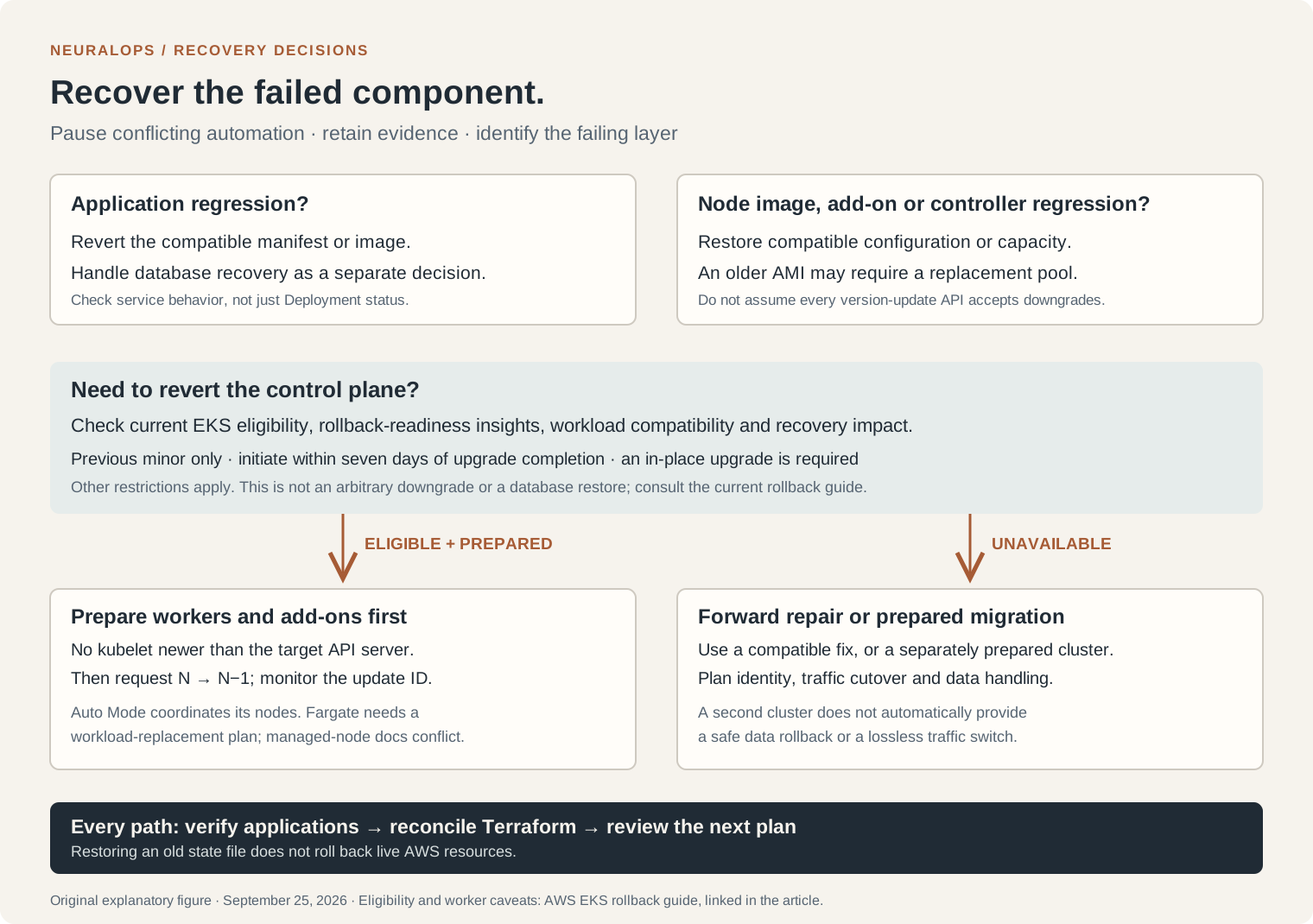
Recovery is a new operational decision. Each path needs application evidence and reconciliation with the desired configuration.
When eligible and prepared, the documented control-plane request uses the normal version-update API with the previous version:
aws eks update-cluster-version --name "$EKS_CLUSTER" \
  --region "$AWS_REGION" --kubernetes-version 1.35
Record the returned update ID and follow describe-update to completion. The version in this example assumes the preceding upgrade was 1.35 → 1.36. If rollback is unavailable, choose a forward repair or a separately prepared cluster migration with explicit identity, traffic and data handling.
Suspend conflicting automation during recovery. Reconcile Terraform configuration with the chosen outcome, refresh its view, and review the next plan before resuming. An old state file describes an earlier observation; restoring it does not roll AWS resources back.
Automate evidence and require human approval to apply
The companion GitHub Actions workflow executes one reviewed stage per run. Its plan job checks current health, generates the plan and records the commit, cluster, stage, artifact digest and creation time. The apply job uses a protected environment; after approval it verifies the artifact and applies the saved plan. A separate observation job checks the result.
Configure required reviewers on that environment, restrict deployment branches and decide whether self-review and administrator bypass are allowed. Merely adding environment: eks-apply to YAML does not configure reviewers. GitHub also limits protection-rule availability by plan and repository visibility. GitHub deployment protections
The example uses OIDC with separate planning, applying and observing roles. Bind each AWS trust policy to the intended repository and environment, and give the observation role the Kubernetes access it actually needs. Private cluster endpoints require a runner with the appropriate network path. GitHub OIDC with AWS
Treat the plan's age as an additional limit, not proof that infrastructure is unchanged. If inputs, state or material operating conditions change, regenerate the plan and obtain approval again. Workflow concurrency coordinates these jobs; backend locking protects state writes across other Terraform callers. Terraform automation guidance
The example's post-change check covers node readiness, one selected Deployment and an HTTP endpoint. Add your business transaction, metrics and observation period before adopting it as a production acceptance gate. A failed check stops that run; it does not launch an automatic rollback. The operator chooses recovery using the evidence and remaining eligibility window.
Watch the complete release stream
Use the EKS release calendar and its documented RSS feed for availability and support deadlines. Poll aws eks describe-cluster-versions in each operated Region to generate a reviewable version proposal. Track platform release notes, EKS AMI releases and component release notes alongside it. An upstream Kubernetes release alone does not establish availability on EKS. EKS lifecycle and RSS, EKS AMI releases
A discovery bot should propose the target version and supporting evidence in an infrastructure PR. The apply workflow begins after that proposal is reviewed and the stage inputs are committed. Keep discovery credentials and permissions narrower than those used to change the cluster.
The operational takeaways
Start with one representative cluster: inventory it, rehearse node replacement, establish application checks, and walk through the approval and recovery paths. Then repeat the same evidence format across the fleet. The durable result is an upgrade process whose next action follows from observed application health, explicit ownership and a reviewed Terraform plan.